Team, roles and seats
Inviting people, what each of the four roles can do, granting one extra permission, and the difference between a Full and a Time seat.
Inviting someone
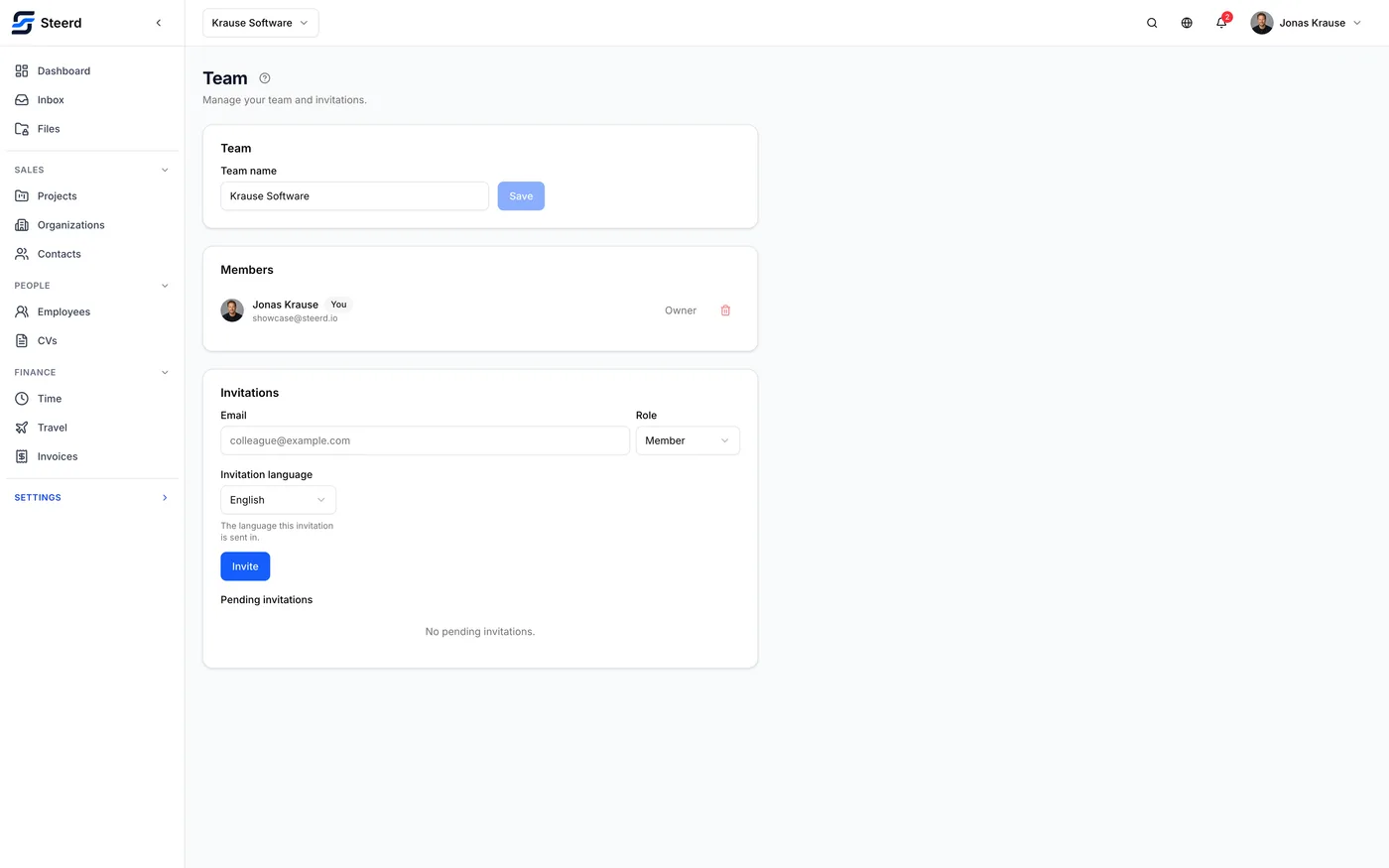
Settings, Team takes an email address and a role, and sends an invitation. You can also copy the link and send it yourself.
Two useful details:
- Invitations expire, and the pending list shows when. You can resend or revoke.
- You choose the invitation language, so a German colleague gets a German invitation regardless of the language you work in.
The four roles
| Role | What it is for |
|---|---|
| Owner | Everything, including billing. Created with the workspace. |
| Admin | Everything except billing. |
| Member | The normal role: projects, CVs, their own time, their own trips. |
| Time tracker | A restricted role for externals. Time and travel only. |
A time tracker is default-denied everywhere else, which is why their sidebar is nearly empty. That is the role working, not a misconfiguration.
Granting one extra permission
Sometimes a member needs one thing their role does not include. Manage access grants specific modules to a single person: view or edit CVs, manage projects, track or manage time.
Two permissions are never grantable this way: billing and member management. An admin cannot mint those for somebody else, which is what stops an admin quietly promoting themselves sideways.
Scopes, for time trackers
A time tracker sees only the organizations and projects you explicitly grant:
A time tracker only sees the organizations and projects you grant here.
An external contractor with no grants sees nothing to track against, so this is the step people forget after inviting one.
Seats
On the Team plan, each member holds one of two seat types:
- a Full seat, for someone using the product,
- a Time seat, cheaper, for someone who only tracks time.
Some full seats are included in the base price; beyond that, seats are billed per seat. The seats screen shows how many are included, how many are billed, and what each type costs.
Changing a seat type or adding a member is a billing change, and Steerd tells you what it will do to your next invoice before you confirm. For an invited person who has not accepted yet, the charge starts when they accept.
If the seats screen mentions billing catching up with a recent change, that is Stripe and Steerd briefly disagreeing after an edit. It settles on its own.
Removing or disabling someone
Disable takes the access away and keeps the person and their history. Their seat is credited to your next invoice, and you can enable them again whenever you want. Remove ends the membership outright.
Both do one more thing, and it is worth knowing before you confirm:
Removing or disabling someone permanently revokes the API keys and contacts sync passwords they created in this team. Enabling them again, or inviting them back, restores the membership and not the credentials.
That is deliberate. A credential that was valid while somebody had access must not turn valid again on its own weeks later, when nobody remembers it exists. So the revocation goes one way only, and nothing brings it back, not for you and not for support.
What stops working
Only what that person created. Keys and sync passwords created by anybody else keep running.
- Their API keys. Scripts, scheduled jobs, and any connected app they authorized. Worth noting: a member who never opened the API keys screen can still have keys, because authorizing a connected app mints one in their name.
- Their contacts sync passwords. Any phone syncing your contacts with one of them stops on its next attempt.
The audit log records each of these revocations with the name of the key or the device, so it is where you find out which integration just went quiet.
Putting it back
If the person is coming back, expect three steps rather than one:
- Invite or enable them again.
- An admin creates a replacement key with the same scopes, on API keys. Only admins and owners can create keys, so the person affected cannot do this part alone.
- Put the new key into the script or service that used the old one. Nothing repoints itself, and an integration left pointing at the revoked key keeps failing silently.
A connected app is the same story from the other end: it has to be authorized again.
The sync password is the one piece they can handle themselves. Once they are back in the team, they create a new one under Syncing contacts to your phone and enter it on the device.
When a colleague loses their second factor
Somebody who can manage members can turn off two-factor authentication for a member from the team list. It takes seconds, and it exists so that a lost phone does not cost anybody the 72 hour wait that the self-service recovery takes.
What it does, stated plainly because it is a real reduction in that person's security:
- they sign in with their password alone until they set a second factor up again
- every session they have open ends
- an email goes out telling them it happened, which is what makes an unauthorized use of this visible to the person affected. Steerd sends it and records whether it went; a mail that bounces does not undo the change.
- it is written to the team's audit log, with who did it
Who it does not work on
Three people are out of reach, and it is not an oversight:
- yourself. Turn your own off under Security, where it asks for your password.
- the owner of this team.
- anyone who owns or administers another team that has other people in it, because their authority reaches past yours.
Those three use the 72 hour self-service path, which needs nobody's permission. Somebody who runs a team alone has nobody to ask, which is who that path is really for.
Use this when you can tell who you are talking to. A message saying "it's me, I lost my phone" is exactly what an attacker sends, and this is the one button that answers it.