Your invoicing profile
The five sections of Settings, Invoicing, the one Save that covers all of them, and why changing your details never rewrites an invoice you have already issued.
Settings, Invoicing holds the company details that appear on every invoice you issue.
You can change them any time; a change never alters an invoice you have already issued.
That sentence is the important one. Your details are snapshotted onto each invoice at the moment you issue it. Move offices next year and last year's invoices still show last year's address, which is what they should show.
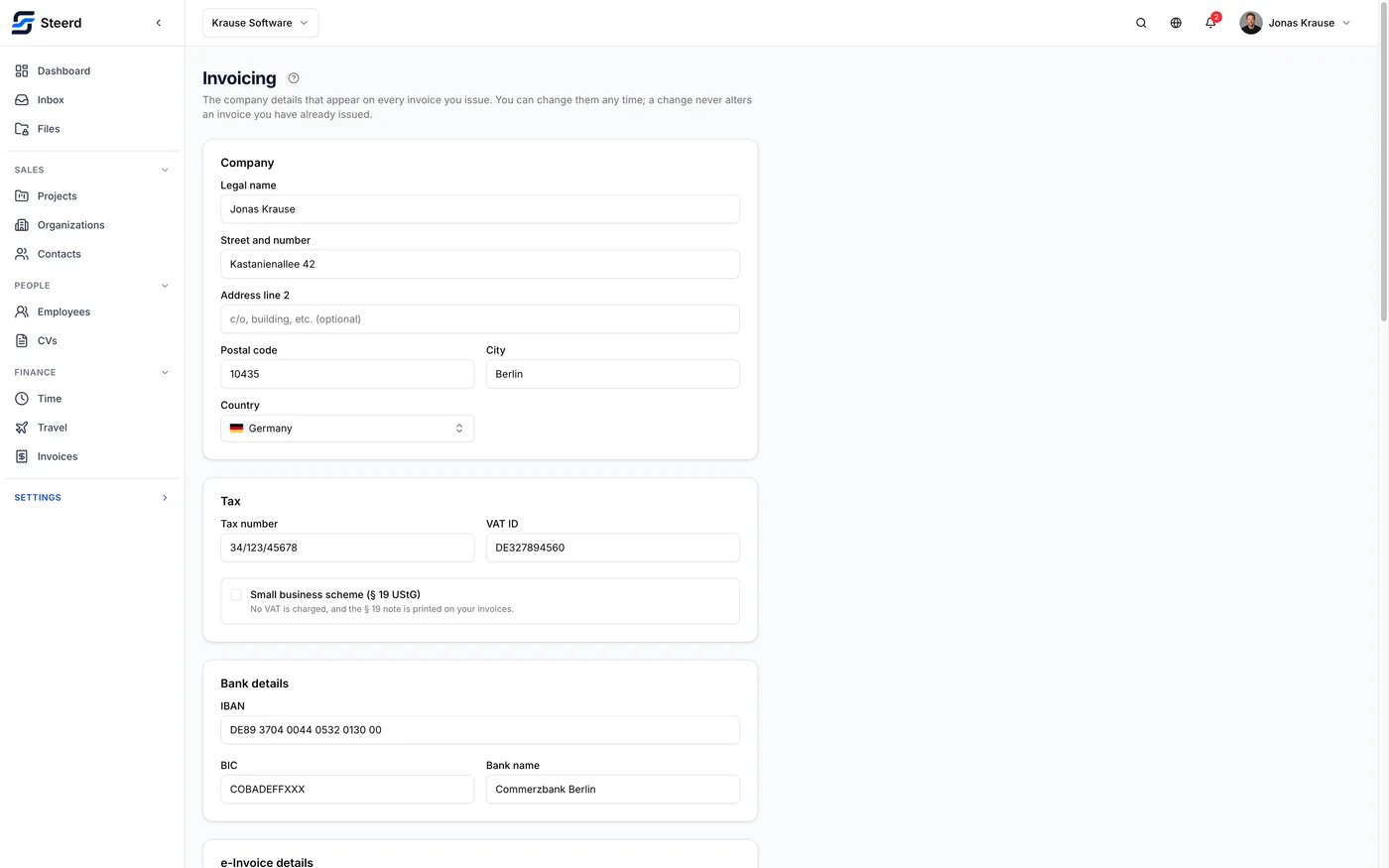
Five sections, one Save
The screen is split into five sections, and the tabs across the top move between them: Company,
Tax and e-invoicing, Payment, Numbering and Document. Each one is its own address,
so /settings/invoicing/numbering is a link you can bookmark or paste into a support reply.
They are five views of one form, not five forms. That has three consequences worth knowing before you start editing:
- An edit you make in one section is still there when you come back from another. Switching tabs does not save and does not discard.
- Save writes all five sections, whichever one you press it from. So does Discard, which puts every section back to what was last saved.
- A tab holding an unsaved edit gets a dot next to its name, and the bar along the bottom counts what is waiting and names the sections it is waiting in. If you press Save from Numbering and it also writes an address you changed ten minutes ago, the bar told you so first.
One thing on this screen is outside all of that, and it is worth knowing before it costs you something: a client prefix under Numbering is not part of the shared form. It has no dot, it is not in the bar's count, and the screen's Save does not write it. Each row saves itself, and an edit you leave sitting in a prefix row is lost the moment you switch to another section. Save that row before you navigate away.
Company
Legal name, street and number, an optional second address line, postal code, city and country.
The legal name is the name you trade under legally, not your brand. If those differ, this field takes the legal one.
Underneath, Register and representatives holds your register court, registered seat, and the people who represent the company, one name per line, printed in the order you list them. These print in the invoice footer. A GmbH has to state all of them on an invoice, and so does a registered merchant (eingetragener Kaufmann); an unregistered sole trader can leave them empty. If you are not sure which of those you are, ask your accountant rather than guessing from this page.
The two role labels set the heading that block prints under, one for German invoices and one for English ones, so a letterhead can say Geschäftsführer rather than a generic category word. Fill in only one and the other language borrows it; leave both empty and the headings fall back to Geschäftsführung and Management.
Tax and e-invoicing
Your tax number and your VAT ID. The checklist needs at least one of them. On a small business invoice a small business identification number counts too, so any one of the three satisfies it there.
The small business scheme switch (Paragraph 19 UStG) changes what Steerd derives everywhere else: your invoices carry no VAT, and you are permanently exempt from issuing e-invoices. Turn it on only if it actually applies to you.
The rest of the section is the e-invoicing block: a contact name, contact email and contact phone number, your country of establishment, an electronic address (typically your invoicing email), the small business identification number above, and your commercial register number.
They are not all needed at the same moment, and it is worth knowing which is which:
- Every e-invoice needs the contact name, email and phone, and needs you identifiable by either a commercial register number or a VAT ID. On an invoice that carries lines not subject to VAT, the VAT ID is left out of the file by rule, so there the register number is the only thing left that can identify you. Fill it in if you have one.
- Only an XRechnung additionally needs your IBAN, your electronic address and the recipient's. A ZUGFeRD or EN 16931 invoice is not held up by a missing electronic address.
Filling them in now costs a minute; discovering them at the moment you are trying to issue is worse. See e-Invoicing.
Payment
Your IBAN, so clients know where to pay, with BIC and bank name beside it. An XRechnung will not go out without an IBAN, because that format has to carry a usable payment instruction. A ZUGFeRD or EN 16931 invoice is not blocked on it, though a client paying by bank transfer will be looking for it.
Payment terms live here too, as a number of days. It prefills the due date on every new invoice. It sits with the bank details rather than under Document because it decides when an invoice is actually due, which is the same question as where the money goes, not a design choice.
Numbering
The prefix and pattern for your invoice numbers, with a live preview of the next number. If you are moving to Steerd part way through a year, Next number is the number the next invoice will be given, so enter the one after your last: a series that has reached 42 continues at 43. See Invoice numbers and numbering patterns.
Client prefixes are in this section as well. When your pattern contains {CLIENT}, each
client can be numbered under its own prefix, so an invoice reads ACME-2026-0004. Each prefix
row is saved on its own, by its Save button or by pressing Enter in the field; it does not ride
the screen's Save, because that write has to happen together with the client's counter.
Changing a prefix needs permission to manage organizations as well as invoices. If you can edit everything else on this screen but the prefixes are read only, that is the permission you are missing.
Document
What the invoice looks like. Your logo, shown at the top right; Steerd converts it to PNG, because the invoice renderer cannot decode WebP and PNG keeps a transparent background. Then an accent color, a contact line and a footer note, both of the last two printed in the invoice footer.
Where in the footer they land is up to the footer layout below them, which you can rearrange. Once you have built a custom layout, its own text blocks own what they print, so an edit to the standalone contact line or footer note above may not show up there.
Choosing a logo file uploads it immediately and the preview updates at once, which is the one thing on this screen that happens before Save. The profile still does not point at the new logo until you save: until then Discard puts the old one back, and the Document tab counts as unsaved.
Who can see this
There are two different states here, and the screen says which one you are in.
If your details cannot be loaded at all, the screen says so rather than sitting on an empty form. Invoicing not being part of your role on this team is one reason for it; a network or server problem reaches the same message:
We could not load your invoicing details. You may not have access to invoicing on this team.
If you can read invoicing but not manage it, everything is visible and nothing is editable. A notice sits above all five sections:
Changing your invoicing details needs permission to manage invoices, which you do not have. You can read everything on this screen and copy what you need from it.
In that state there is no Save button on any section, and the logo upload and footer editor are gone rather than merely disabled. Read-only is a real state, not a locked-out one: you can still open all five sections and copy what you need out of them.